WD2026 App Guide
We encourage WD2026 delegates to download the conference app to access key event information, explore the program, and plan your time at the Women Deliver 2026 Conference.
This page will guide you through getting started and making the most of the app.
Event Access & Login
Download the Evexus app to your mobile device:
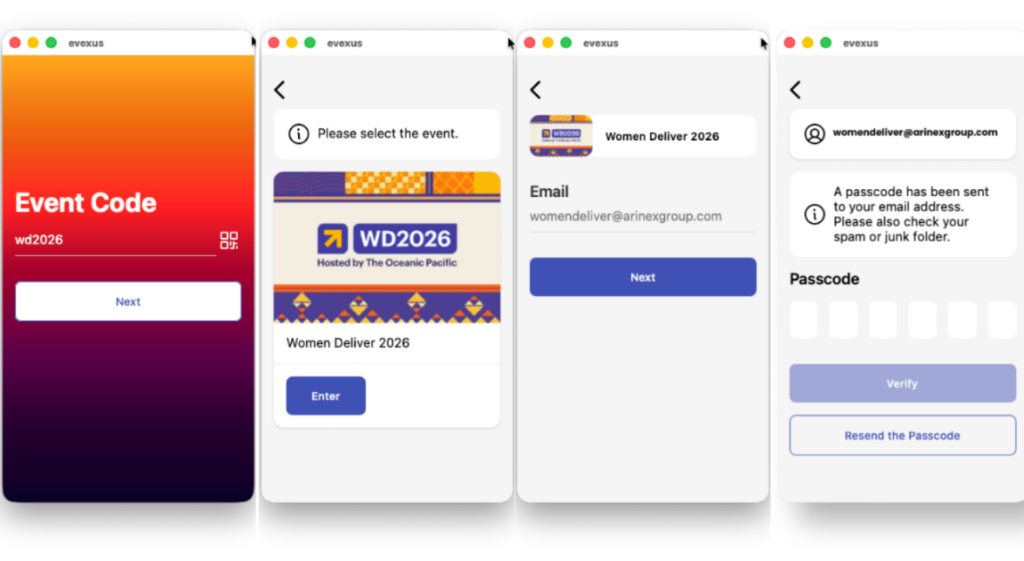
Attendees can gain quick access to the event app by entering the designated event code, their email address, and a unique passcode. The passcode is automatically generated and sent to the attendee’s email and mobile via SMS, ensuring a smooth and convenient login process.

Attendee Personal Profile
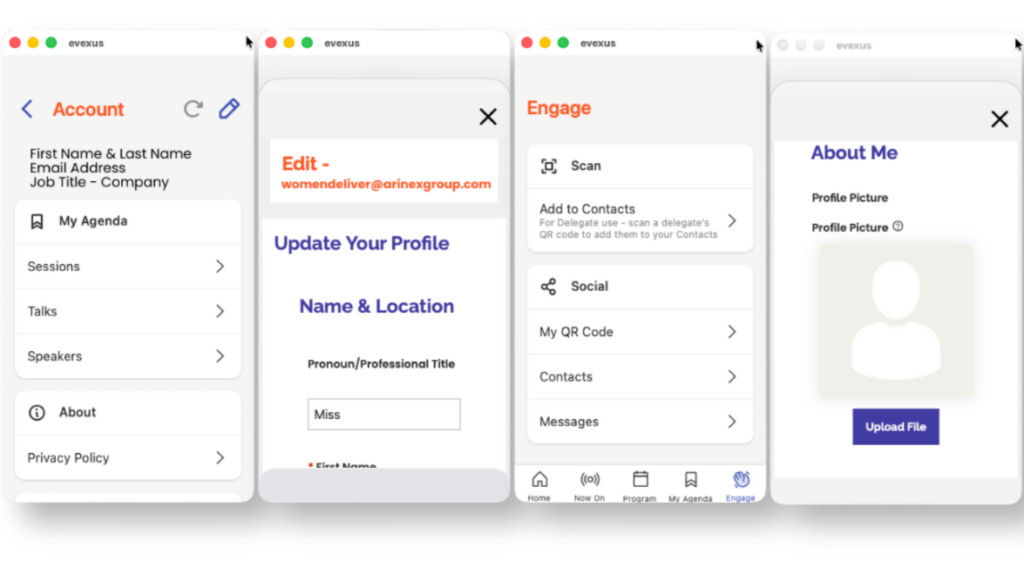
Each attendee has their own dedicated user account page on the event app, where they can update their profile information, review a personalised itinerary, and manage contacts.
Additionally, a unique QR code enables attendees to easily share contact details with other participants, sponsors, and exhibitors, helping foster meaningful post-event connections.
Homepage Display
The event app homepage brings together essential content to engage and inform attendees, featuring a prominent event app banner, sponsor banners, newsfeed updates, and clickable icons for quick access to speakers and sponsors lists. It is customizable and can include general event details and key onsite resources, such as FAQs and maps, ensuring participants have all the necessary information and navigation tools at their fingertips.

Newsfeed
The newsfeed feature allows attendees to share images and posts, capturing memorable moments or key insights, and can generate a sense of community within the event. Participants can engage by liking and commenting on these posts, fostering interaction and community spirit within the app.
Additionally, posts can be pinned to the top of the feed to highlight important updates or announcements from event organisers or sponsors, ensuring crucial information remains visible and accessible to all attendees.
Interactive Agenda/Program
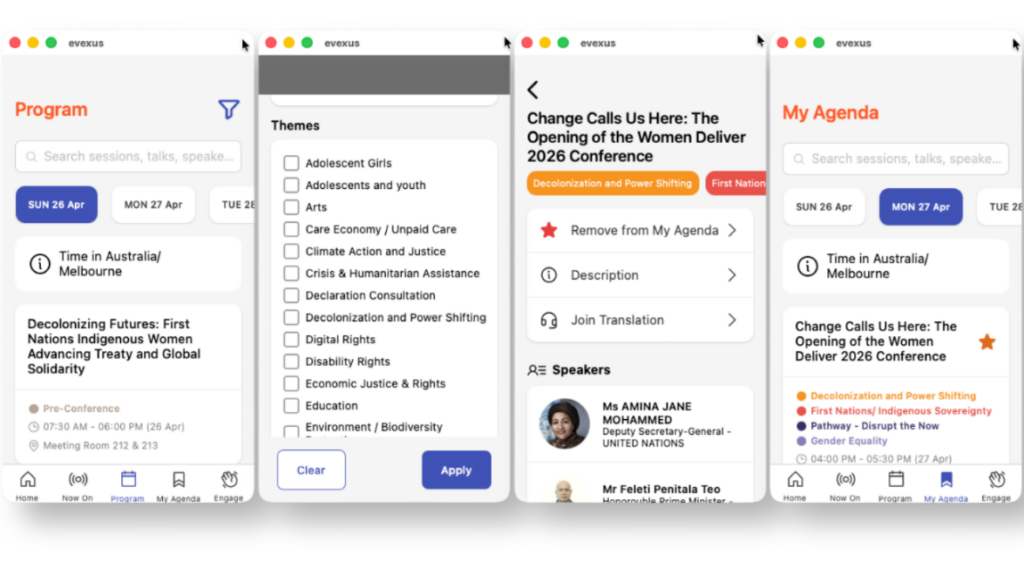
The event app’s interactive agenda allows attendees to efficiently view all upcoming sessions and explore the complete event program. Users can filter sessions by themes, presentation type, or by room. There is the ability to apply coloured tags to specific sessions for visual review of the program.
Furthermore, they may add preferred sessions to their calendar to create a personalised itinerary. The integrated Q&A function supports real-time interaction during sessions, and the ‘Now On’ feature highlights sessions starting in 15–30 minutes for easy onsite navigation.

Session Check In
Attendees can check in to specific sessions by scanning the session QR code or using the in-app check-in feature. This helps track attendance and post-event reporting or can support CPD requirements if required.

Session & Event Surveys
The Evexus app provides support for two distinct types of surveys: Session Surveys and Event Surveys.
Session Surveys
Session Surveys are designed to be allocated to specific sessions within the event program. Attendees may be required to complete multiple Session Surveys, depending on the sessions they participate in. These surveys are accessible directly from the relevant session in the ‘agenda’, allowing for targeted feedback and insights on individual presentations.
Event Surveys
Event Surveys differ from Session Surveys in that they are not linked to any particular session. Instead, an Event Survey is intended to capture broader feedback about the overall event experience and may only be completed once by each attendee.
Access to the Event Survey is provided through a dedicated icon on the homepage of the app, ensuring ease of use and visibility for all participants.

Attendee Networking
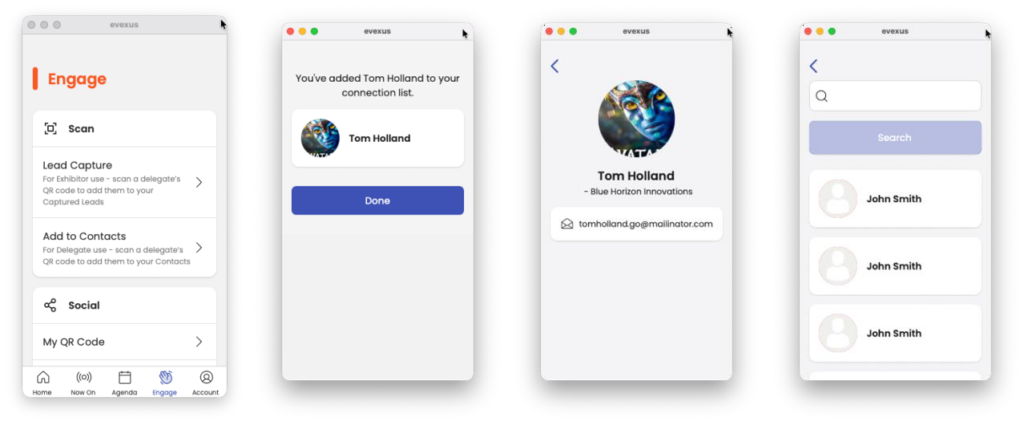
Attendees can conveniently exchange contact details using the ‘Add to Contacts’ feature, which leverages each individual’s personalised QR code for swift information sharing. This process ensures that connections made during the event can be easily maintained post-event. All registered delegates have access to the app’s native 1:1 messaging function. By searching for a contact’s name or company, users can initiate direct conversations, enabling efficient and secure communication between participants throughout the event.
Exhibitors and Sponsors
The event app has dedicated branded spaces and prominent placements for sponsors across the app interface, offering increased visibility and engagement opportunities. We can create virtual booths for organisations and apply categories (such as gold, silver, platinums tiers etc.) to house each organisations information and can host resources.
The integrated ‘Lead Capture’ functionality allows sponsors and exhibitors to efficiently collect delegate contact information by scanning attendees unique QR code. They have the ability to attach private notes for each scanned contact, and can seamlessly export these leads for post-event follow-up. This streamlined process ensures sponsors and exhibitors can maximise networking during and after the event.


Push Notifications
Push notifications can be scheduled in advance or sent instantly to attendees’ devices, ensuring timely communication of important updates. These notifications support plain text messages, which may include event announcements, sponsor communications, or changes to the event program. Once sent, notifications appear on the user’s device home screen and are also accessible within the event app under the bell icon. The bell icon vibrates to alert users when there are unread notifications. If the attendee has enabled pop-up notifications in their device settings, notifications will also appear as pop-ups on their devices, providing immediate visibility.

App Accessibility
WCAG 2.1 AA compliant